
If you’re at all like me, you’re chafing at the bit waiting for an announcement that Theatrhythm Final Fantasy will be released outside of Japan. With two demos now available for Japanese 3DS owners and the official release only a few days away, I for one am feeling even more anxious to get my hands on this adorable-looking title.
Luckily for all of us lacking in the Japanese 3DS department, Square Enix has opened a special promotional website for the game where you can select a character and play along… It may not be anywhere close to the real Theatrhythm experience, but it’s the best we’re going to get for now! The site and game, called Social Theatrhythm, will be open until March 30th. Click on the link to head on over to the site, and use this tutorial so that you can join in the fun!
Upon loading the page, you should be treated to this:
 |
| Click on the image to view a larger version |
Before we get started, it should be noted that the “social” aspect of Theatrhythm requires you to allow the application to be linked to either your Twitter or Facebook account. I signed in using my Twitter, but either is fair game!
Click the left-most orange link to get started! It’s worth noting that the greyed-out link at the bottom that says “coming soon” will eventually lead to a number of promotional commercials and movies. Knowing Japan’s knack for creating some of the wackiest and most adorable commercials in the world, it’ll definitely be worth checking out later on.
The next screen will have two options, highlighted in orange (sorry, I don’t have a screenshot). It should be easy to make out – one will say “Twitter” and the other “Facebook” followed by some Japanese. This is where you select which account you would like to use to play the game. Clicking on the link will then take you to a pop-up window where you must authorize Social Theatrhythm to access your account. When it’s finished, just close it and return to the previous window – if everything’s linked correctly, then you should next be treated to the character select screen.
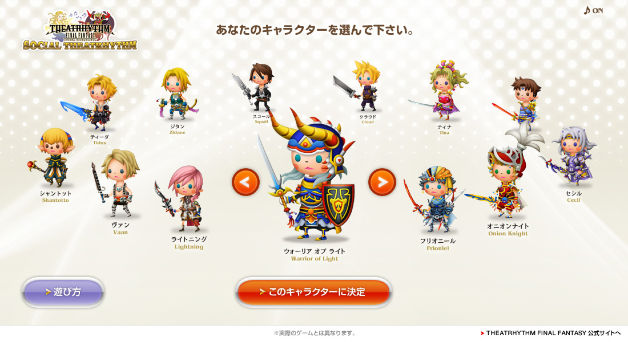
Now you’re free to select the character of your choice out of the heroes from the numbered installments in the series. Click the left and right arrows and, when you’re happy with your selection, simply click the orange button on the bottom there to proceed. I meant to select Zidane (the hero of my favorite Final Fantasy, of course!), but for some reason my web browser didn’t register my click and went ahead and selected the Hero of Light for me. Bummer!
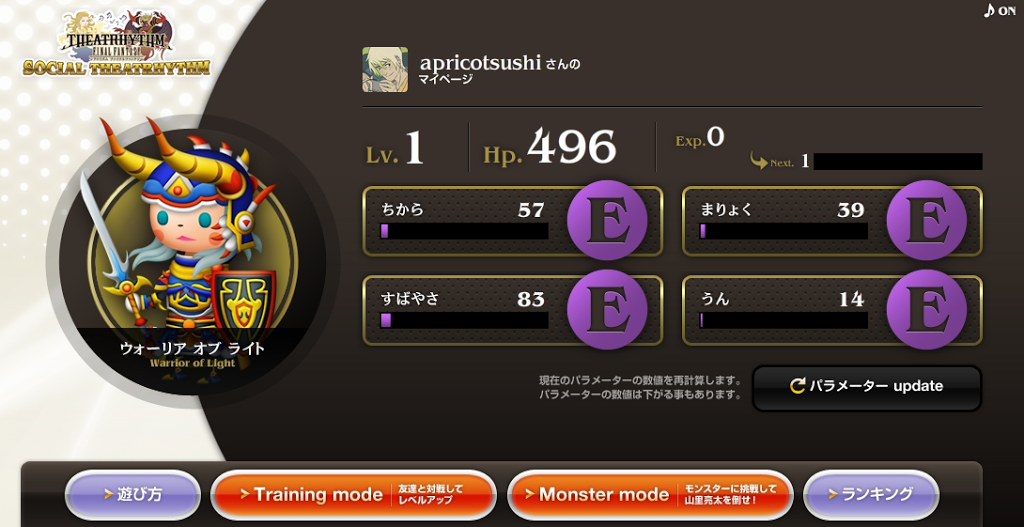
Next you’ll see your character profile page! There’s my character, the Warrior of Light, on the left, and you can see I’m signed in as me from my avatar up there next to “apricotsushi” on the top. In order to level up your character, you must select the orange “training mode” button on the bottom and fight against your friends – or anyone who happens to pop up on the user list, really. Just for kicks I “fought” a level 2 Japanese Twitter user, and upon defeating them I had enough experience to level up to level 2.
If you feel like kicking my butt with your rhythmic prowess, be sure to follow @apricotsushi over on Twitter! People who you are following will appear highest on the list, and even your friends who haven’t signed up will appear with randomly-generated characters. I assume the system works the same for those of you who choose to sign in using Facebook, but I can’t say for sure. Upon defeating a player, a message will pop up asking you if you want to post a status to your Twitter/Facebook – click the left button to simply return to your character screen, or if you want to really confuse your friends with a Japanese status update, go ahead and click the right one.
After you’ve leveled up some, click on “monster mode” to go off and fight Final Fantasy monsters alongside other users!
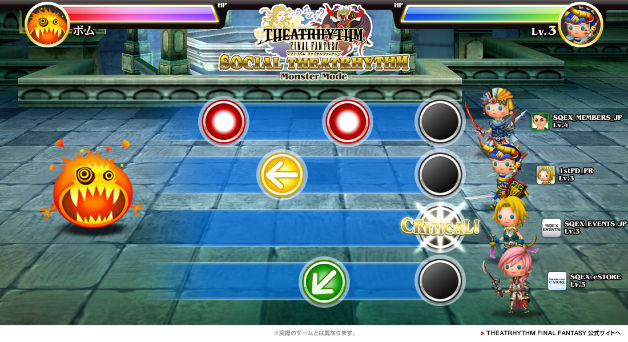
The gameplay is pretty straightforward – simply click the mouse at the appropriate time to line up the colored circles over the grey one on the right to deal damage to the enemy. A miss results in your own HP being depleted. The screen is exactly how it would appear in the game, but as this is a browser-based game and not being played with the stylus, all you’re required to do is click the mouse and occasionally click and hold it down for the longer actions.
And there you have it! After defeating a few of the monsters, you’ll be treated to a fight with the last boss, who’s face takes on the appearance of a famous Japanese comedian. Some players who manage to defeat the final boss will be randomly selected to receive a free 3DS, but I’m sure you must be a resident of Japan to participate. I haven’t gotten that far yet, but I’ll let you know when I do!
If you leave the page and come back later, remember that you will need to authorize your account all over again, but this doesn’t mean you’ll start from scratch. After it’s done doing its thing, you’ll bypass the character selection screen and return to your profile page.
Be sure to tell me what you think of the game when you give it a go! Of course it’s very rudimentary, but it’s cute none the less, and you’re treated to some snazzy Final Fantasy tunes.
Let me know if you have any questions or experience any problems!

Thanks for this, Anne! I just tried it out. LOVE the music. The gameplay is very rudimentary in this format, but it seems it’ll be much more interesting on the 3DS. Fingers crossed that SE does the right thing and announces this one for AU/EU/NA release SOON!
BTW, I think I sent one of those confusing tweets to all of my followers. Didn’t I know I was doing it until it was too late. LOL!
All of the characters eyes look creepy! XD
I’ll definitely be playing around with this website tomorrow! It looks fun if a little basic. Fun!
Interesting stuff, I dig it.
Bryan – Yeah, the game is pretty bare-bones, but there’s not much that you can do in a web browser… Especially when you’re trying to emulate a rhythm game with touch controls! I enjoy it just for the music and images, though!
I’m almost afraid SE won’t localize this one… A horrible thought, am I right?!
Alois – Oh, good, I’m going to sign on right now and beat up on your character 😉
Tom – Thanks for the comment and the follow! Glad you enjoyed the tutorial.
Thanks for this find! My better half (who is Japanese) had a lot of fun with this! 😀
You’re welcome, GamesAndBiz! I had a lot of fun with it, myself 🙂
Thank you so much for the tutorial! I’m sure this will come in handy to lots of fans who don’t speak Japanese.
Do you think you could shed some light on how the parameters work, though? I’m doing it through Facebook, so it may be different, but it seems they tie in to various content on one’s profile. I can see that power comes from number of friends, but speed, magic, and luck are a bit less clear. I’m guessing it has something to do with one’s posts? If I choose to update my parameters after someone has liked a post of mine, my magic goes up, but beyond that I’m a little clueless. Thank you for any and all help!
Hi Angela! And you’re welcome!
As for the parameters, I wish I could go in to the game and try some things out to tell you more, but right now it doesn’t seem to be loading for me :/ As for the “update” button, I think that is basically a “refresh” button, so I think your parameters are raised depending on your actions and not necessarily if you choose to click it or not. Unfortunately the game doesn’t have much in a way of a tutorial…
I’ll try again tomorrow to see if it will load for me! Hopefully it does – I’ll get back to you once I take a look at it again. Sorry about that!