
To start, open the iTunes store on your computer. Once it’s loaded, scroll down to the bottom of the page and click the flag displaying your current regional settings on the right (mine is currently USA).

2. A list of countries will appear, scroll down to the bottom of the page and click on the Japanese flag at the bottom left to access the Japanese store.

3. You will now be in the Japanese iTunes store. Before creating an account, you need to select the FREE app you want. Here I downloaded ポケモン言えTAP?
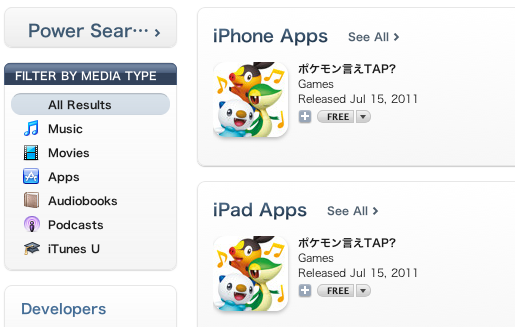
4. Pokemon Ie Tap? should appear in the search results. Click on the “free” button to be prompted to make a Japanese iTunes account.
5. Click on “Create new account.” Then select “continue.”
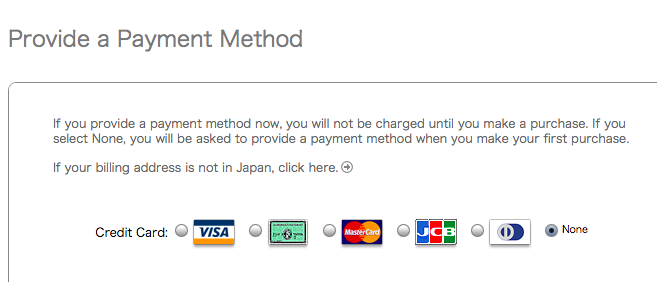
6. At the top of the page it will say: “If your billing address is not in Japan, click here.” Disregard this, as you will not be entering your credit card details and do not need to provide an address.
7. Agree to the terms and select “continue.”
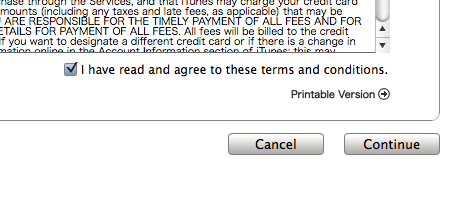
8. Fill out your personal details and select “continue.” If you already have an iTunes account for your current region of residence, you will need to use a different email address when creating a Japanese account.
9. For “Credit Card,” select “none.” If the “none” option doesn’t appear, that means you’ve made a mistake somewhere along the way–you probably didn’t select Pokemon Ie Tap? in the iTunes app store. Remember, you need to have started from a free app in order for the “none” selection to appear.
10. You’ll have to enter an address, so use your Google-fu to look up a legitimate Japanese zip code (example: 100-8994). The rest of the address can be made up, as you won’t be using it. For your phone number, you must also come up with a legitimate-looking number. One possible area code is 03 and then the following number should look like this: xxxx-xxxx.
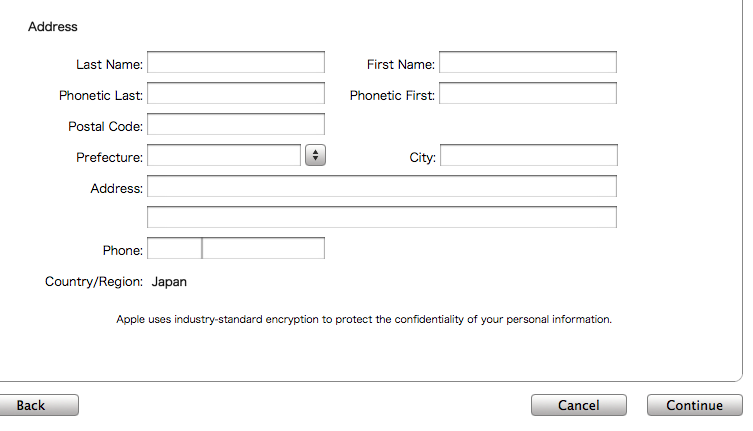 |
| Note: For Phonetic First and Phonetic Last, you can just reenter your name. This is for Japanese kanji where there can be more than one potential reading for the same characters |
11. Click “continue,” and if you have entered the address correctly, you will be met with a screen telling you to verify your Apple ID by checking the email address you provided at the beginning.
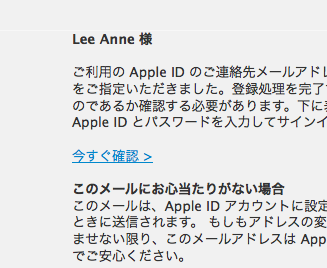
12. You should have received an email from Apple. The subject will be in Japanese but will begin with the words “Apple ID.” Open the email, and click the link highlighted in the image below to verify your account.
13. You will be directed to a page where you need to sign in using your email address and password. Click in the blue button after you have done so.
14. A green check mark with text will appear. Click the blue button to return to the iTunes store. If iTunes doesn’t open automatically, go ahead and access the store in iTunes yourself, and sign in by clicking “Sign In” at the top right corner.

Congratulations, you now have a Japanese iTunes account! Now you’ll need to find the app you want again to download it. Paste the title into the search bar one more time. Once it comes up, all you need to do is click on it to be prompted to enter your password and start the download! Try all different types of searches to unearth some fun and quirky free Japanese apps! Enjoy!